Skip to content

Features

Built around how collectors actually keep track.

Add pairs in seconds, keep what you paid next to your own estimate, and see how your collection changes over time.

Add a pair

Catalog search fills in the details

Start from catalog search, or add a pair manually. Search by model name, nickname or SKU and pick a result: details such as brand, model, colorway, nickname, SKU, release date and original retail price can be filled in for you. You choose which fields to use, and nothing is saved until you tap Save.
  1. 1Tap Add Sneaker, then Find a Sneaker or Add Manually.
  2. 2Choose a result. The editor opens with the catalog fields filled in. Fields you’ve already entered stay as they are unless you switch them on.
  3. 3Add your size (US Men’s, US Women’s, UK or EU, including half sizes), condition, retailer, notes and your own photos.
  4. 4Save. Manual entry always works, even offline.
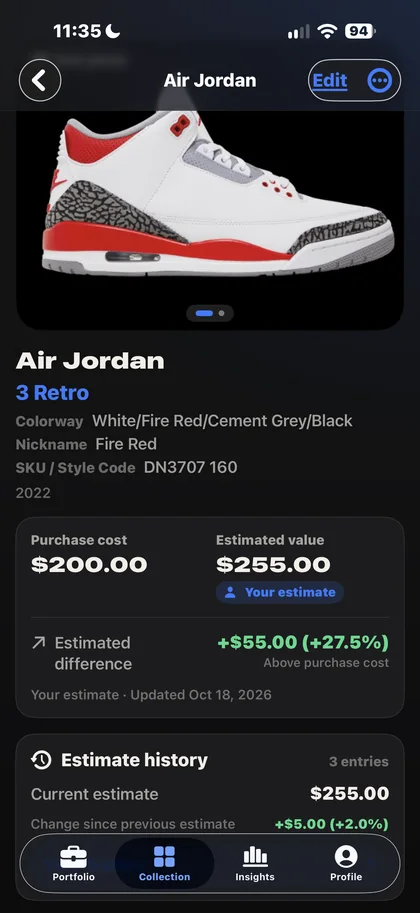
Pair detail with purchase cost, the owner’s estimate and the estimated difference.

Costs and estimates

What you paid, next to what you think it’s worth

Each pair keeps its purchase price and your own estimate of its current value. The difference shows as a gain or a loss, and the totals roll up to your whole portfolio.

  1. 1Open a pair and tap Edit.
  2. 2Enter the purchase price and Your estimate. Add a source note or link if you like.
  3. 3See the estimated difference on the pair and in your portfolio totals.
Example pair
Purchase cost
$200.00
Your estimate
$255.00
Estimated difference
+$55.00 (+27.5%)

Figures from the example shown in the screenshots.

Estimate history

Every change, dated

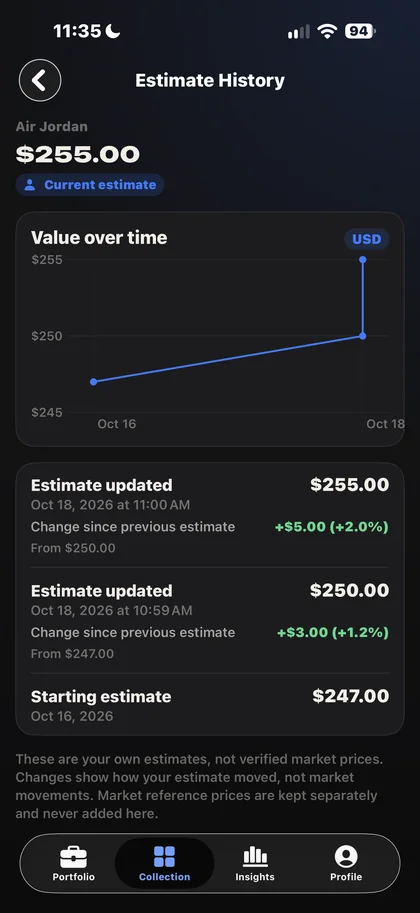
When you change an estimate, the app keeps a dated entry with the change since your previous estimate. A chart shows how your estimate has moved.
  1. 1Open a pair and find the Estimate history card.
  2. 2Tap View history to see the chart and every entry.
  3. 3Export your estimate history as a CSV file from the Profile tab.
Estimate history chart and dated list of estimate changes.
Estimate history
Oct 16 · Starting estimate
$247.00
Oct 18 · Estimate updated
+$3.00 (+1.2%)
Oct 18 · Estimate updated
+$5.00 (+2.0%)

Filtered summaries

Explore any part of your collection

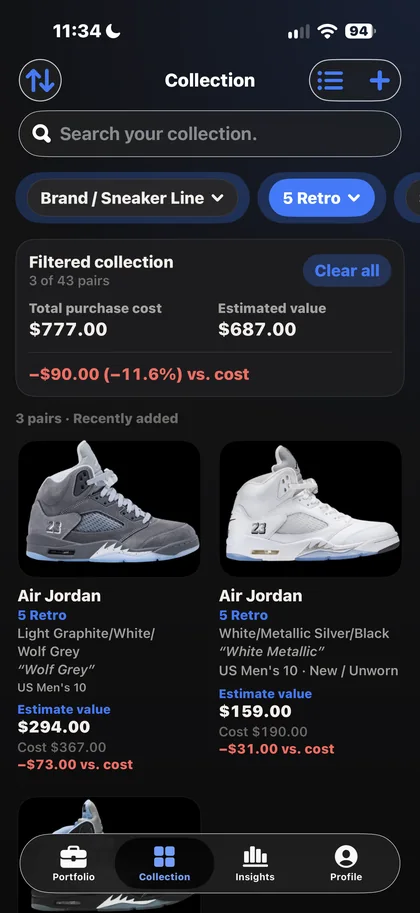
Search or filter by brand, sneaker line, size or condition. The Filtered collection card adds up purchase cost, estimated value and difference for just the matching pairs.
  1. 1Open the Collection tab.
  2. 2Search, or choose a filter such as Brand / Sneaker Line.
  3. 3Read the combined totals for the matching pairs. Clear all to go back.
Filtered collection summary for three 5 Retro pairs.
Filtered: 5 Retro · 3 of 43 pairs
Total purchase cost
$777.00
Estimated value
$687.00
Difference
−$90.00 (−11.6%)

Insights

See where your value sits

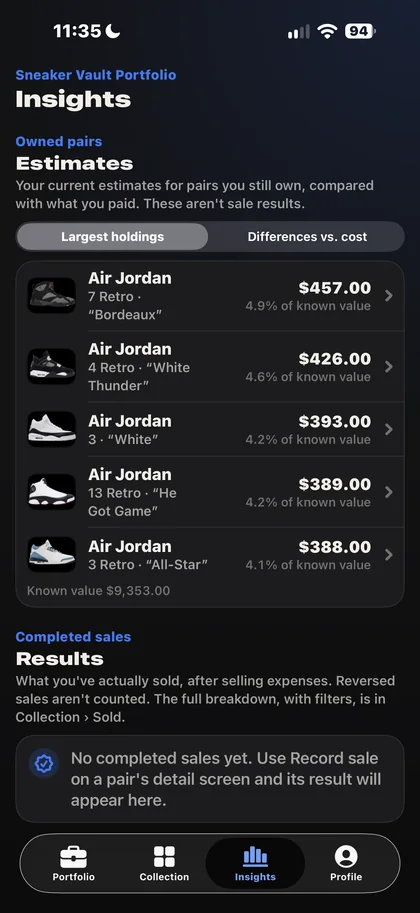
Insights ranks your largest holdings by your estimates and shows each pair’s share of your estimated portfolio value. Switch to differences to see which pairs are above or below what you paid.
  1. 1Open the Insights tab.
  2. 2Switch between Largest holdings and Differences vs. cost.
  3. 3Tap a pair to open it.
Insights screen with largest holdings and their share of value.

Sales tracking

Record what you actually sold

Record a sale with its date, price, platform, fees, shipping and other expenses. Try a price first with the “If I sell” calculator. Sold pairs keep their full history, leave your portfolio totals and appear in the sales summary on the Insights tab.

  1. 1On a pair, tap Record sale and enter the details.
  2. 2Review the result, then tap Mark as Sold.
  3. 3Changed your mind? Undo Sold… moves the pair back. The reversed sale is kept for your records but never counted.
Example sale
Sale price
$320.00
Fees and shipping
−$41.60
Purchase cost
−$200.00
Realized result
+$78.40

Illustrative numbers.

Market references

Optional prices for comparison, kept separate

Market references can help you decide on your own estimate. They never replace it.

Your estimate

The value you enter for each pair, with an optional source note or link. It powers your portfolio totals, differences and Insights. Every change is saved with a date, and the app never changes it for you.

Market references

Optional, for comparison. On pairs with a SKU, tap Check market prices to see the lowest asking prices for your size and a 90-day average sale price across all sizes from third-party US marketplaces. They’re kept separate and never change your estimates or totals.

Who sets it
Your estimate:YouMarket references:Third-party US marketplaces
Used in your totals, differences and Insights
Your estimate:Market references:
Saved with dated history
Your estimate:Market references:
Updated automatically
Your estimate:Market references:
How current
Your estimate:As of your last updateMarket references:Collected periodically, not real-time

And also

The essentials, done properly

Backups and exports

Export a full backup as one .zip file with every pair and your photos, restore it later, or export a CSV spreadsheet.

Private by design

No account. Your collection stays on your iPhone. Your prices, estimates, notes and photos are never sent to us.

Find pairs fast

Search your collection and sort or filter by brand, model, size, condition or status.

Estimates in Sneaker Vault Portfolio are your own figures. They aren’t appraisals, financial advice or a promise of what a pair will sell for. The app doesn’t authenticate sneakers and isn’t affiliated with any brand or marketplace.

Coming soon to the App Store

Questions? Visit support